
Description
Snelgraveren Product Designer adds a modern, secure product designer to your WooCommerce store. Customers add text, photos, clip art, and SVG artwork onto your products, see a live price, and their design flows straight into your order and production workflow.
Built from the ground up as a secure alternative to legacy product designers, with server-side price calculation, strict file validation, and SVG sanitization on every upload.
Designer
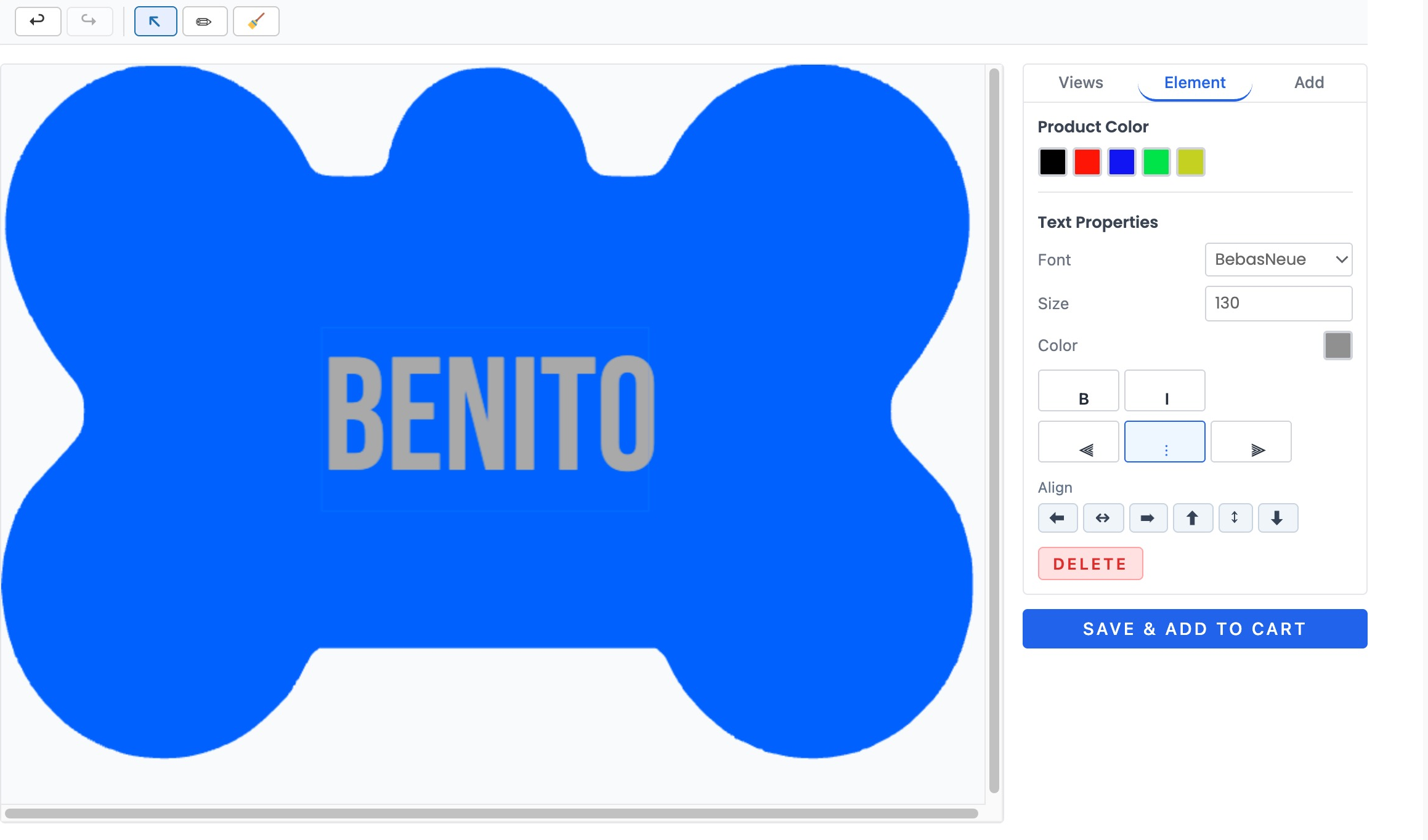
- Drag-and-drop canvas editor (Fabric.js) with multiple product views
- Text, photos, SVG artwork, and curated clip art collections
- Single-stroke engraving fonts for laser/CNC tool paths
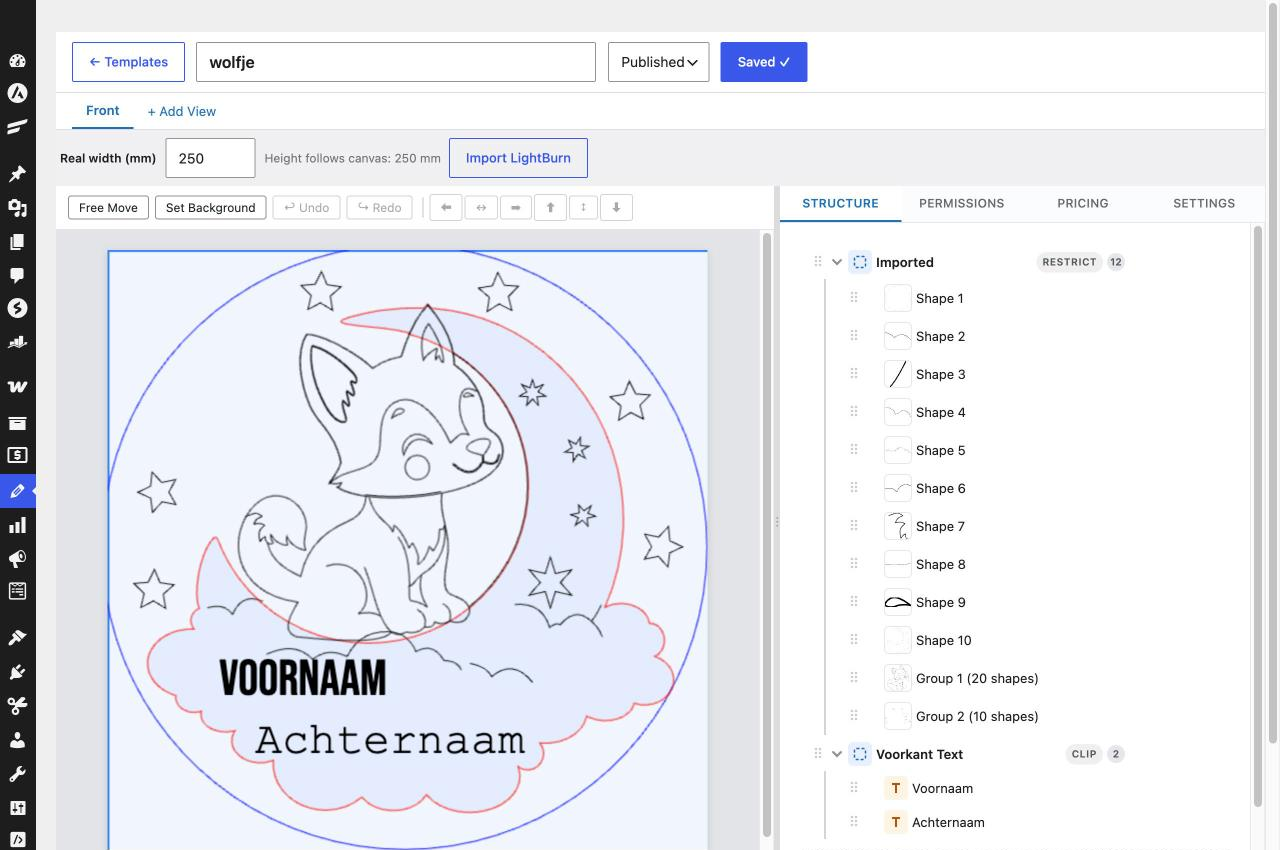
- Design zones with boundaries and per-zone permissions
- Live design surcharge preview while the customer edits
- Image resolution warnings before a blurry design reaches production
- Vector-only mode for engraving products (blocks raster photo uploads)
- Works with classic themes (shortcode, auto-render) and block themes (Gutenberg block)
- Layers panel: pick any element from a list, even where elements overlap on the canvas
- Mobile-friendly modal designer
Store owner tools
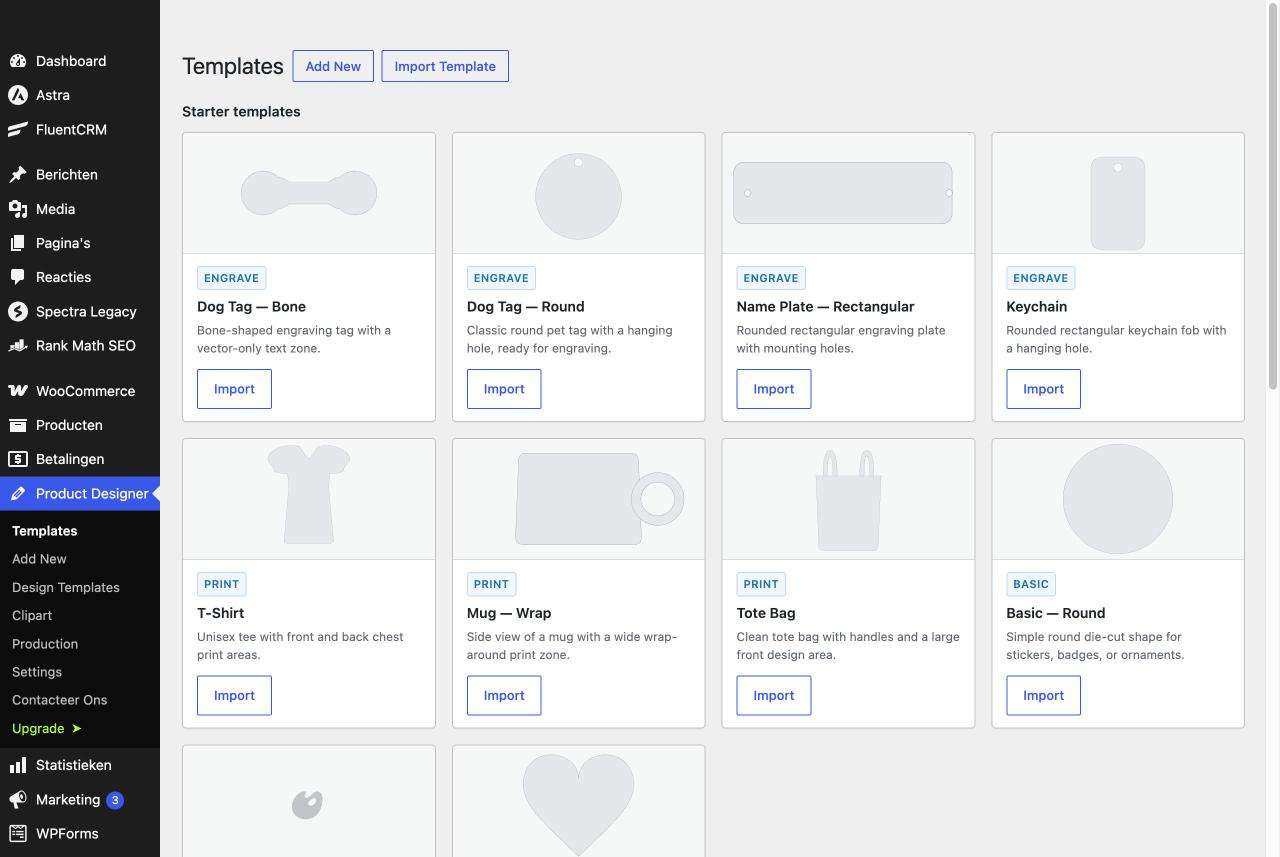
- Ready-made starter templates: import one click from the built-in gallery
- Template builder with views, zones, layers, permissions, and pricing rules
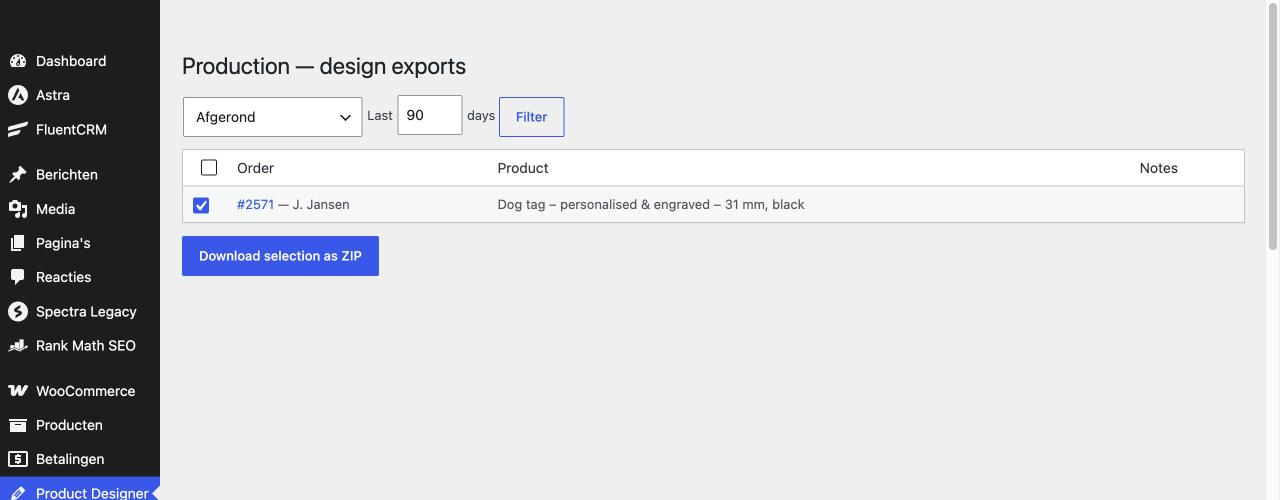
- Production dashboard: all orders with designs, bulk ZIP export for a production run
- Automatic design exports (PDF, PNG, SVG, LightBurn .lbrn2) when an order reaches a chosen status
- Designs overview: every saved design in one list — hand a design you made over to a customer’s account, or reopen it in the designer
- Font groups: named sets of fonts you assign per template; add a font to a group once and every template using it follows
- Design statistics: saved vs. ordered designs and conversion
- “My designs” tab on the customer account page
- Automatic cleanup of abandoned guest designs (configurable retention)
- System status checks with e-mail alerts when something needs attention
Security first
- All prices calculated server-side — client values are never trusted
- Every SVG sanitized, every upload MIME-validated
- Design links use unguessable random identifiers
- Rate-limited uploads
Free vs Pro
The free plugin is a complete, working product designer. Pro adds the tools that turn it into a full production and pricing workflow.
Free:
- Drag-and-drop designer (text, photos, SVG)
- Unlimited templates
- Ready-made starter templates
- PNG export
- Shortcode + Gutenberg block
- “My designs” in the customer account
- Mobile designer
- Server-side pricing and SVG sanitization
Pro adds:
- Multiple product views (front, back, …)
- Custom font uploads and font groups
- Clip art collections
- Pricing rules (surcharge per element or per tier)
- Per-element and per-zone permissions
- SVG-shape design zones and safe areas
- Product colors and color palettes
- PDF, SVG and native LightBurn (.lbrn2) production export — text stays editable in LightBurn
- Automatic export on order status
- Upload restrictions (vector-only engraving)
- LightBurn (.lbrn2) import of your own artwork as a template
- Download a design’s production SVG or LightBurn file straight from the Designs list, order or not
- Send a design as a proof for customer approval
Learn more and compare plans on the product page linked from this listing.
Development
The full source code (including the un-minified JavaScript sources for the compiled files in dist/) and build tooling are publicly available at:
https://github.com/temmink/snelgraveren-product-designer
Build steps: npm install && npm run build (Vite) compiles the designer and admin bundles into dist/; composer install --no-dev installs the PHP dependencies. See the repository README for details.
External Services
This plugin uses the Freemius SDK for license validation, plugin update delivery, and optional usage analytics.
No data is sent anywhere before you act. On activation, Freemius shows an opt-in screen with two choices:
- “Skip” — nothing is sent. The plugin works fully offline; only your Pro license key (if you have one) is validated against Freemius’ servers when you activate a license.
- “Allow & Continue” — you opt in to license validation, update delivery, and anonymized usage analytics. Only then does the plugin share: your site URL, WordPress and PHP versions, the list of active plugins and theme, and the admin e-mail address, with Freemius (freemius.com), a licensing and analytics service used by many WordPress and WooCommerce plugins.
You can review or withdraw this consent at any time from the plugin’s account/opt-in prompts. This service is used for licensing and update delivery — no customer, design, or order data is ever sent to Freemius.
Freemius Privacy Policy: https://freemius.com/privacy/
Freemius Terms of Service: https://freemius.com/terms/
No other external services are used. Design exports (PDF/PNG/SVG) are rendered entirely on your own server — nothing about your customers’ designs, uploads, or orders is ever sent off-site.
Screenshots
Blocks
This plugin provides 1 block.
- Snelgraveren Product Designer Shows the product designer on a customizable product page. Place it anywhere in the product template or description.
Installation
- Upload the plugin ZIP via Plugins Add New Upload Plugin, or unzip into
wp-content/plugins/. - Activate the plugin (WooCommerce must be installed and active).
- Open Product Designer Templates and import a starter template, or build your own.
- Edit a product, enable the designer, and pick a template.
- Block theme? Place the “Snelgraveren Product Designer” block in your Single Product template or product description.
FAQ
-
Does it work with block themes?
-
Yes. Classic themes render the designer automatically on the product page (or via the
[sgpd_designer]shortcode). Block themes use the Snelgraveren Product Designer block in the Site Editor or product description. -
Where are the production files?
-
Exports (PDF, PNG, SVG, LightBurn .lbrn2) are generated locally on your server — nothing is sent to external services. Download them per order or in bulk from the Production dashboard.
-
Saving a design fails with “No route was found matching the URL and request method”
-
That message comes from WordPress, not from the plugin: your web server’s firewall (typically ModSecurity on cPanel hosting, with
SecRequestBodyNoFilesLimitat 1 MB) refused the save before it reached the plugin and let WordPress answer a request it has no route for. It only happened for designs large enough to cross that limit, usually ones with a photo. Since 1.12.5 the designer sends the design’s export files as file uploads, which fall under the server’s much larger file limit, so update the plugin first. If a save is still refused, the designer now says so in plain words; ask your host to raise the request-body limits (SecRequestBodyNoFilesLimit, and PHP’spost_max_size/upload_max_filesize) for your site. -
What does the free version include?
-
The free version includes the full designer with unlimited templates and PNG export. Pro unlocks multiple product views, PDF/SVG/LightBurn production export, automatic exports on order status, pricing rules, custom fonts, clip art management, color palettes, and more.
Reviews
There are no reviews for this plugin.
Contributors & Developers
“Snelgraveren Product Designer for WooCommerce” is open source software. The following people have contributed to this plugin.
Contributors
Translate “Snelgraveren Product Designer for WooCommerce” into your language.
Interested in development?
Browse the code, check out the SVN repository, or subscribe to the development log by RSS.
Changelog
1.12.5
- Fix: saving a design with a photo failed on some hosts with “No route was found matching the URL and request method”. Hosting firewalls (ModSecurity on cPanel) refuse requests whose non-file body exceeds 1 MB, and the save sent the full-resolution export as one JSON payload. Every export is now sent as a file part, which falls under the far larger file limit; older cached bundles keep working.
- Improved: when a server still refuses a save or upload before it reaches the plugin, the designer now explains that the design is too large for the server’s limits instead of showing WordPress’ “no route” message. A save whose payload was dropped entirely by PHP is refused instead of overwriting the design with an empty canvas.
1.12.4
- Fix: on a phone, a product set to the modal display mode showed two “Customize Product” buttons under each other, and the lower one did nothing. There is now one button, and it opens the designer.
- Fix: the free build no longer requests a live price preview on every canvas change — that endpoint only exists in Pro, so each change produced a needless 404 in the server log.
1.12.3
- Fix: the LightBurn import (Pro) skipped every Rect and Ellipse shape as “unreadable” — LightBurn stores those without a vertex list, only their size. They now import as outlines, so a 200 mm slate drawn as a rectangle sets the true design size.
- New: “PT Serif Caption” added to the built-in Google Fonts, so LightBurn text set in it imports as editable text instead of an outline.
1.12.2
- New: a Layers tab in the designer sidebar listing every selectable element, topmost first. Where elements overlap on the canvas, a click can land on the wrong one — the list selects exactly the element you mean, and selecting from the list keeps you on the Layers tab.
1.12.1
- New: download a design straight from the Designs admin page as a production SVG or native LightBurn file (Pro) — draft or not, no order needed. A design saved before 1.11.0 has no LightBurn data yet; the row explains to reopen and re-save it once.
- Improved: on the Designs admin page, clicking a design’s product name (or thumbnail) now opens the design itself in the designer, in a new tab. The WooCommerce product edit screen stays reachable via a small “edit product” link.
1.12.0
- New: font groups — create named sets of fonts on the new Product Designer Fonts admin page and enable whole groups per template in the builder. Adding a font to a group later automatically makes it available in every template using that group, including existing ones.
- Fixed: uninstall now removes the clip art items table when “delete data on uninstall” is enabled.
1.11.4
- Improved: clip art in the designer is now chosen from a large-preview panel that opens when the customer clicks a category, instead of tiny thumbnails in the sidebar.
1.11.3
- Improved: the clip art upload size limit was raised from 512 KB to 3 MB per SVG file.
1.11.2
- New: a “Delete design” action on the Designs page — permanently removes a design together with its thumbnails and export files, after confirmation. Designs that belong to an order are protected and cannot be deleted. The automatic guest-draft cleanup (Settings guest design retention) is unchanged and remains deliberately more conservative.
1.11.1
- Improved: the Production dashboard’s bulk ZIP now contains every available export format per design (PNG, PDF, SVG and LightBurn) instead of only the configured default. Formats that cannot be generated are listed in a LEESMIJ file inside the ZIP rather than failing the download.
1.11.0
- Fixed: the SVG export of designs with curved text silently fell back to a bitmap — Fabric.js emits malformed XML for rotated styled characters, which the sanitizer rejected without a trace. The markup is now repaired and validated before saving, and rejections are logged.
- Fixed: zone overlays, clip paths and the invisible baseline curves of curved text no longer leak into the SVG exports.
- Improved: the “SVG” export now outlines every glyph at the exact position and rotation of the approved design (kerning and letter spacing included) and carries real millimetre dimensions.
- Improved: the “SVG + fonts” export writes curved text as a standard textPath over its own curve, so it imports correctly into LightBurn while staying editable.
- New (Pro): native LightBurn export (.lbrn2) — text as editable LightBurn Text shapes with the bend calibrated against LightBurn’s own rendering, vector art as Path shapes in millimetres.
1.10.0
- New (Pro): send a design to a customer as a proof for approval instead of handing over the full editor. The customer gets an e-mailed link to a read-only page showing exactly what was saved — no login needed — with a button to approve and go straight to checkout, or to request a change with a short note. Approving adds the design to their cart automatically.
- New (Pro): Product Designer Designs shows the status of every proof you have sent, and lets you resend it after making changes or withdraw it to make the link stop working.
- New (Pro): you are notified by e-mail when a customer approves a proof or asks for a change, and the customer is notified when you send or resend one.
Earlier versions
- The full history back to 1.0.0 is in the readme.txt history on GitHub: https://github.com/temmink/snelgraveren-product-designer