

Description
TNT AI Writer is the AI content generator that starts every article with proof of demand. It finds what people are actually searching for right now, scores every topic for real ranking opportunity, and writes a complete, fact-grounded article draft. Topic discovery, opportunity scoring, and keyword research use 100% free data sources with no API key at all; writing the article with AI uses your own API key.
Most AI writer plugins hand you generic, one-size-fits-all text. TNT AI Writer researches your exact topic first — real Wikipedia facts, real Reddit questions, real recent headlines — then writes around that research, so every draft is grounded in something true instead of guessed.
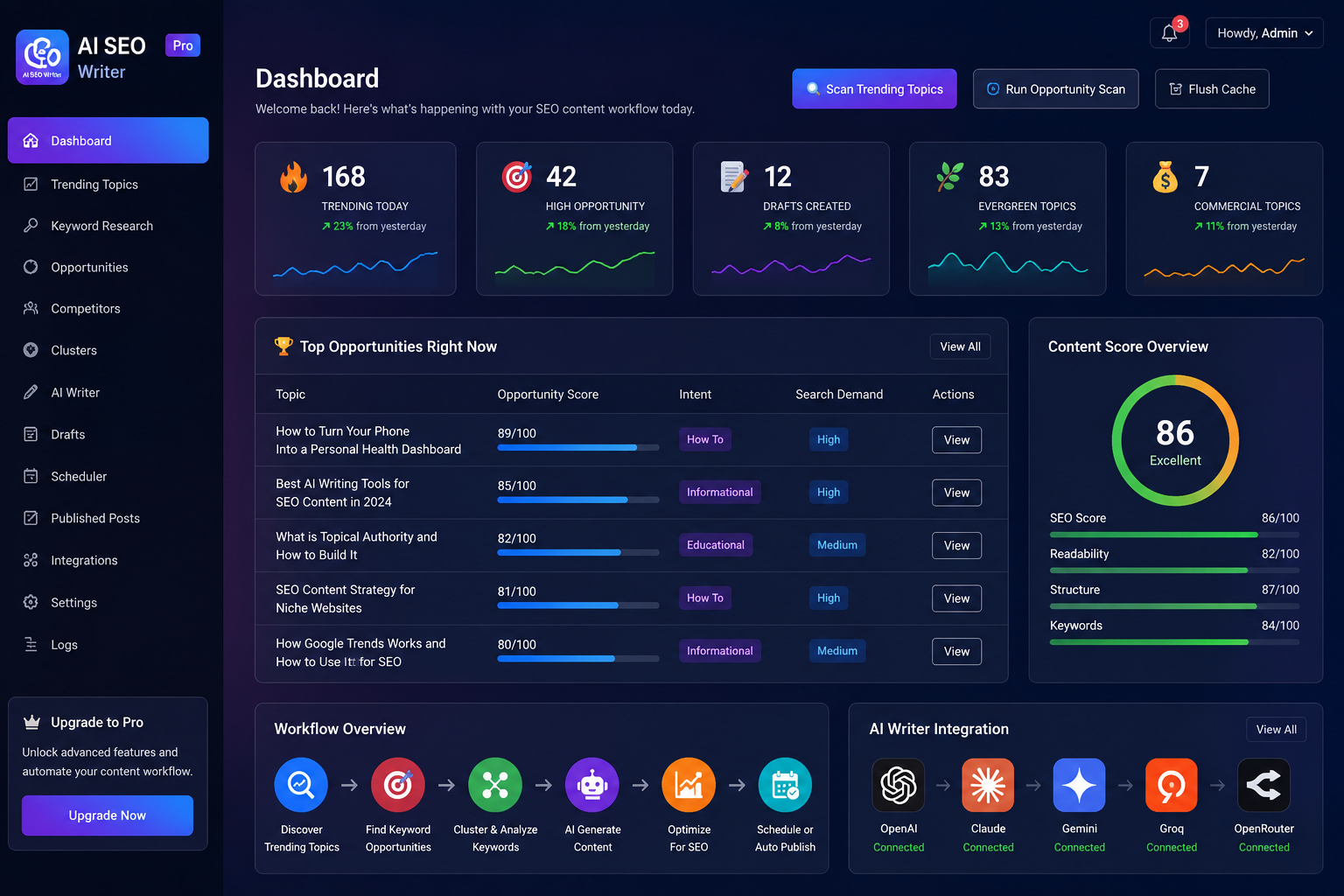
🔥 Discover Trending Topics Automatically
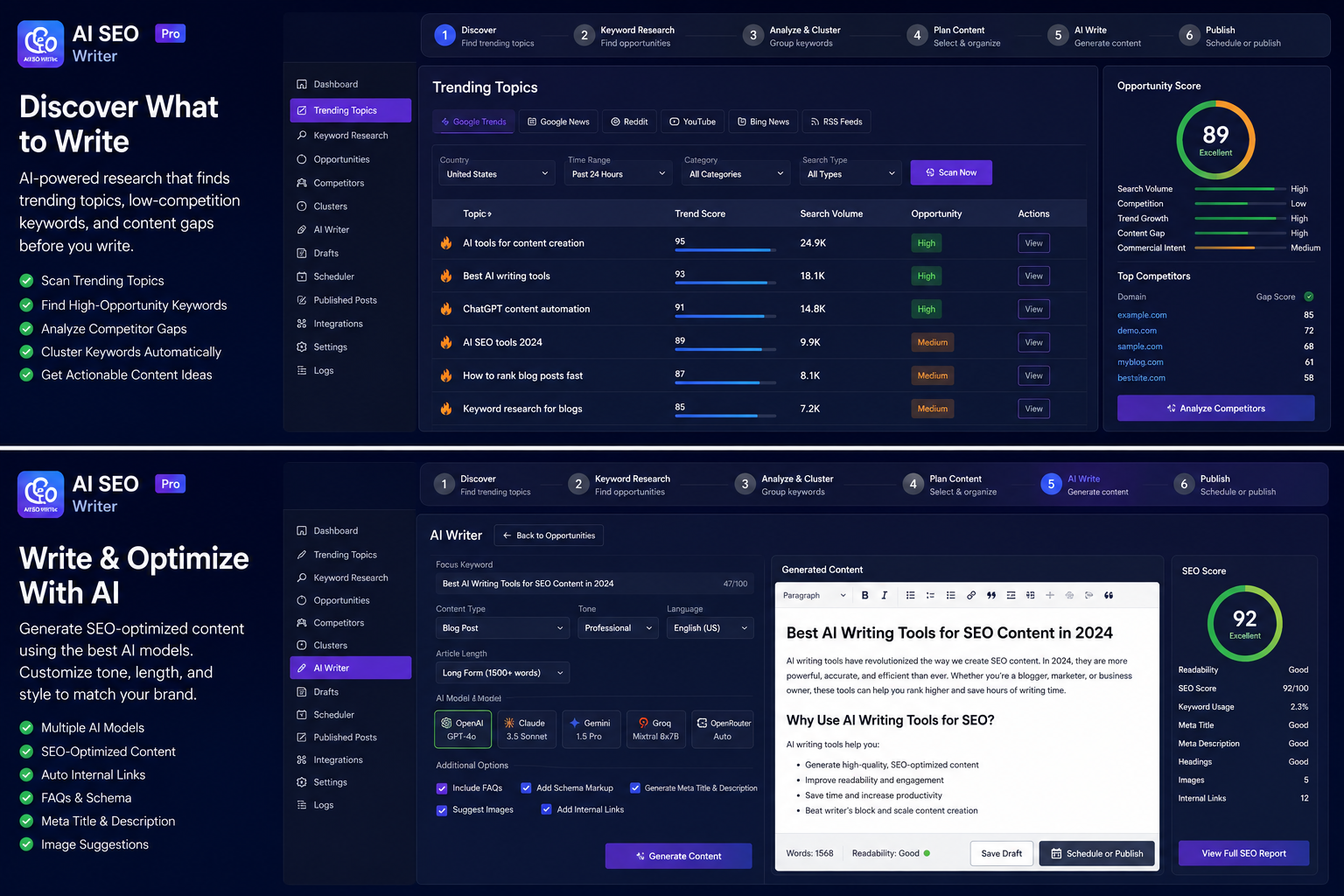
One click scans free public sources for what people are searching and discussing right now:
- Google Trends (daily trending searches)
- Google News & Bing News headlines
- Reddit community discussions
- Google, Bing & YouTube search suggestions
🎯 Opportunity Scoring That Finds Easy Wins
Every discovered topic is scored 0–100 using a weighted formula: user pain × search demand × evergreen value × commercial intent × competition × trend growth. Sort by score and write what’s most likely to rank — then mark it “Used” once you’ve drafted it, so your topic list always shows what’s still up for grabs.
✍️ Complete AI Article Drafts — Grounded in Real Data
This is not a “spin the same template” generator. Before writing, the plugin researches your exact topic:
- Real facts from Wikipedia and DuckDuckGo (with source attribution)
- Real questions people ask on Reddit and in search suggestions
- Recent headlines for current context
With your own API key connected (Settings AI Content Engine), Pollinations AI writes a unique, structured article: engaging intro, H2/H3 sections, step-by-step instructions, comparison table, 6-question FAQ, and conclusion. Choose 1,000 / 2,000 / 3,000 / 5,000 words — long articles are automatically continued and completed, never cut off mid-sentence. No key yet, or prefer ChatGPT, Claude, or Gemini directly? Use Copy AI Prompt to grab the exact research-grounded prompt for free and paste it anywhere.
Drafts and previews only. Nothing is ever auto-published. You always review, edit, and publish manually.
🔑 Built-In Keyword Research
For any topic: primary keyword, secondary keywords, long-tail phrases, People Also Ask questions, and semantic variations — with estimated difficulty (Easy Very Hard).
📐 SEO Done For You
- SEO title (under 60 chars) + meta description (under 160 chars) + clean slug
- Article + FAQ schema markup (JSON-LD)
- Open Graph & Twitter Card metadata
- One-click integration with Yoast SEO, Rank Math, and All in One SEO — fields pre-filled automatically
- Internal link suggestions from your existing posts
- Auto-generated, always-relevant featured image via free Pollinations AI — no key needed for images
⚡ Workflow & Productivity Tools
- CSV export for Trending Topics, Keyword Research, and Opportunities — take your data anywhere
- Mark as Used / Drafted — track which topics you’ve already covered, with New / Used filter tabs
- Copy AI Prompt — get the exact research-grounded prompt for any external AI chat tool
- Settings import/export — move your configuration between sites in one click
🆓 Free Plan
- Unlimited topic discovery, opportunity scoring & keyword research — no API key, no signup, no credit card
- Unlimited article previews in template + research mode, no key needed
- Connect your own API key any time to switch article writing over to AI
🎥 See It In Action
Watch a full walkthrough: TNT AI Writer on YouTube
Want a broader SEO health check for your site? Try aiseogic.com, a free AI-powered SEO site audit tool from the same team.
💡 Why Choose TNT AI Writer?
- No API key for research, ever. Topic discovery, opportunity scoring, and keyword research are 100% free and keyless — you only need a key when you’re ready to have AI write the draft.
- Grounded in real research, not just a prompt. Wikipedia facts, live Reddit questions, and current headlines feed the AI — so drafts read like they were actually researched, because they were.
- No AI key yet? You still get a full draft. Template + research mode writes a complete, unique article with zero setup, or export the built-in prompt to paste into any free AI chat.
- Safety by design. Nothing is ever auto-published. Every article is a draft or a preview until you say otherwise.
- You’re not locked into one SEO plugin. Works with Yoast SEO, Rank Math, or All in One SEO — pick yours in Settings.
- Own your data. One-click CSV export and JSON settings export mean your topics, keywords, and configuration are never trapped in the plugin.
⭐ TNT AI Writer Pro
Need more? TNT AI Writer Pro adds:
- All AI providers — OpenRouter (free models), Google Gemini, Groq, and OpenAI with your own key, plus unlimited AI drafts every month
- Full automation — hourly topic scans, daily opportunity scoring, and a weekly auto-draft queue
- Bulk generation — complete drafts for your top 10 opportunities in one click
- Content clusters — automatic pillar + subtopic silos for topical authority
- SERP & competitor gap analysis with a ready-made outline to beat the top results
- Content refresh finder for stale, thin, or outdated published posts
- Advanced schema — HowTo, Review, BreadcrumbList, and VideoObject
- Premium image sources (Pixabay, Unsplash) with relevance verification
- Google Discover scoring and monetisation signals
- One-click Google Web Story (AMP) generation
- Multisite & agency license with priority support
External services
This plugin connects to third-party services to discover topics, research facts, and generate content and images. Data is only sent when you actively use the related feature (clicking “Scan Trending Topics”, “Generate Keywords”, “Generate Draft”, or “Copy AI Prompt”). No personal data, account data, or site visitor data is ever transmitted — only the topic/keyword text being researched.
Google (Trends, News, Suggest) — used to discover trending topics, news headlines, and search suggestions. The search topic string is sent to trends.google.com, news.google.com, and suggestqueries.google.com when you run a scan or keyword research. Google Privacy Policy
Bing (News, Suggest) — used for additional news headlines and search suggestions. The topic string is sent to bing.com and api.bing.com during scans. Microsoft Privacy Statement
Reddit — used to find real questions and discussions about a topic, via Reddit’s official OAuth API (requires your own free Client ID/Secret from a Reddit “script” app — see Settings). The topic string and your Reddit app credentials are sent to reddit.com and oauth.reddit.com during scans and draft research. Skipped entirely if no Reddit app is configured. Reddit Privacy Policy
Wikipedia (Wikimedia Foundation) — used to fetch a factual definition and background for the article topic. The topic string is sent to en.wikipedia.org’s public API during draft generation. Wikimedia Privacy Policy
DuckDuckGo — used as a fallback source for topic definitions. The topic string is sent to api.duckduckgo.com during draft generation. DuckDuckGo Privacy Policy
Pollinations AI — used to generate the article text (text.pollinations.ai) and the featured image (image.pollinations.ai). The article prompt — containing the topic, keywords, and research facts — plus your own API key are sent when you generate an AI-written draft. Image generation does not require a key. Pollinations Terms & Privacy
You can leave the API Key field empty, or set AI Provider to “None” (Settings AI Content Engine), at any time; the plugin will then work in template + research mode using only the discovery sources above, with no AI service contacted.
Screenshots
Installation
- In your WordPress admin, go to Plugins Add New and search for “TNT AI Writer”, or upload the ZIP via Upload Plugin.
- Click Install Now, then Activate.
- Go to TNT AI Writer Settings, pick your SEO plugin (Yoast / Rank Math / AIOSEO), optionally a niche focus, and — if you want AI-written drafts — paste your API key under AI Content Engine.
- Go to Dashboard 🔍 Scan Trending Topics.
- Open Opportunities, pick a high-scoring topic, click ✍️ Generate Preview.
- Copy the HTML into a new post, or copy the AI prompt to write it elsewhere — then review and publish manually.
FAQ
-
Is TNT AI Writer really free?
-
Yes. Topic discovery, opportunity scoring, keyword research, and article previews (in template + research mode) are unlimited on the free plan with no API key, no signup, and no credit card. Having AI write the article requires your own API key. Pro adds unlimited saved drafts, automation, bulk generation, and more.
-
Do I need an API key?
-
Only for AI-written articles. Topic discovery, opportunity scoring, and keyword research never need a key. To have Pollinations AI write the draft, add your own API key under Settings AI Content Engine. Without a key, every draft is still generated in full using template + research mode — or use Copy AI Prompt to write it for free with ChatGPT, Claude, or Gemini instead.
-
Will the plugin publish posts automatically?
-
Never. Every generated article is a preview or a WordPress Draft. Publishing is always your manual decision.
-
Is every generated article unique?
-
Yes. Each draft is grounded in live research for that exact topic (Wikipedia facts, real Reddit questions, current headlines) and written fresh by AI. Even the non-AI template mode injects this real data, so no two articles share the same content.
-
Is there a limit on how many articles I can generate for free?
-
No. The free plan generates unlimited article previews — full research, SEO metadata, and schema markup, with no monthly cap, in template + research mode. With your own API key connected, AI-written previews are unlimited too. Saving previews directly as WordPress draft posts (with featured image and SEO plugin meta auto-filled) is a Pro feature.
-
Can I write the article for free without an API key?
-
Yes, two ways: leave AI Provider set to “None” for automatic template + research mode, or click Copy AI Prompt on any topic to copy the exact research-grounded prompt (built from the same Wikipedia facts, Reddit questions, and keywords used internally) and paste it into ChatGPT, Claude, Gemini, or any free AI chat tool.
-
Does it work with Gutenberg and the Classic Editor?
-
Yes — generated content is clean standard HTML compatible with both.
-
Does it work with Yoast SEO, Rank Math, or All in One SEO?
-
Yes. Select your SEO plugin in Settings and every draft’s SEO title, meta description, and focus keyword are filled in automatically.
-
Can I control which topics appear?
-
Yes — set a niche focus, a minimum opportunity score, and an excluded-keywords list in Settings. You can also mark topics as “Used” once drafted, so your lists only show what’s still available.
-
Can I export my topics and keywords?
-
Yes — every list (Trending Topics, Keyword Research, and Opportunities) has a one-click CSV export button.
-
Can I move my settings to another site?
-
Yes — Settings Import/Export Settings lets you download your configuration as a JSON file and import it on another install.
-
Where does the plugin store its data?
-
In its own database tables (topics, keywords, drafts, logs). Deleting the plugin removes all tables, options, and cached data automatically.
Reviews

Contributors & Developers
“TNT AI Writer – AI Content Generator, Trending Topic Finder & SEO Draft Writer” is open source software. The following people have contributed to this plugin.
Contributors
Interested in development?
Browse the code, check out the SVN repository, or subscribe to the development log by RSS.
Changelog
1.2.0
Fixes:
- Google Trends discovery was returning zero results — Google retired the old
/trends/trendingsearches/daily/rssfeed; updated to the current/trending/rssendpoint - Reddit discovery/research was returning zero results — Reddit permanently retired unauthenticated
.jsonAPI access in May 2026. Reddit is now used via its official OAuth API; add a free Client ID/Secret under Settings Reddit API to keep using it (skipped automatically, with no errors, if left unconfigured) - Network-activating on WordPress Multisite only provisioned database tables on one site, leaving every other site in the network broken; activation now provisions every existing site, and new sites created afterward are provisioned automatically too
- The uninstaller only cleaned up the current site’s data on Multisite; it now loops every site in the network
1.1.0
Changed:
- AI-written articles now require your own API key (Settings AI Content Engine API Key). Topic discovery, opportunity scoring, keyword research, and template + research mode previews remain completely free and keyless.
New features:
- API Key field for AI article writing, with a clear “no key template mode” fallback
- CSV export for Trending Topics, Keyword Research, and Opportunities
- “Mark as Used / Drafted” workflow for topics, with New / Used filter tabs
- “Copy AI Prompt” button — get the exact research-grounded prompt for any AI chat tool, free
- Settings import/export as a portable JSON file
- “Leave a Review” and “Docs” links added to the admin dashboard and Plugins list
Security hardening:
- Escaped topic- and keyword-derived text at every HTML output point in article generation
- Sanitized keyword suggestions from third-party autocomplete APIs before storage and use
- Added extra JSON script-injection hardening to schema.org markup output
- Fixed two missing output-escaping calls in the admin UI
- Hardened the admin notice renderer against any future unescaped server message
Fixes:
- Removed an unused draft-limit class and corrected an FAQ entry that no longer matched actual behavior — free-plan previews are unlimited
- Confirmed compatibility with WordPress 7.1 and PHP 8.1–8.3
1.0.0
First public release.